
TagSpaces Lite - Get APK
You'll be able to download in few seconds.
Publisher Description
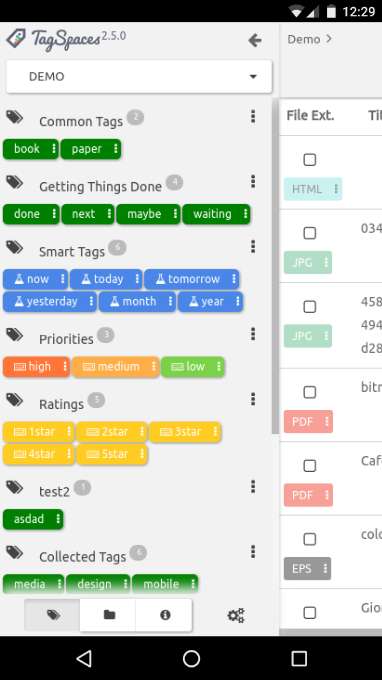
TagSpaces lets you organize, tag and browse your files, photos and documents on many platforms.
Great for:
★ Browsing, tagging, viewing and editing of your local files directly in the app without the need of external applications
★ Creating and managing notes and web snippets (like in Evernote® but completely offline)
★ Creating your personal wiki system
Key Features:
★ Basic file and directory management
★ File tagging based on the files names -> extremely portable across devices and platforms
★ Integrated PDF viewer
★ Integrated MHTML and MHT viewer
★ Integrated MD, Markdown viewer
★ Advanced WYSIWYG HTML5 editor
★ Simple text and source code viewer and editor supporting most of the common programming languages
What is TagSpaces?
★ File manager, which allows you to navigate and organize your local files with the help of tags.
★ An extensible platform providing a consistent, cross-platform user interface for your files.
★ A purely offline running application, which is internet independent.
TagSpaces is available for free as native application for Windows, Mac OS X, Linux, as Chrome extension and also as Firefox addon.
Known issues:
★ On some Android versions and or devices the virtual keyboard does not work as expected.
About TagSpaces Lite
The company that develops TagSpaces Lite is TagSpaces UG (haftungsbeschraenkt). The latest version released by its developer is 1.0 .
To install TagSpaces Lite on your Android device, just click the green Continue To App button above to start the installation process. The app is listed on our website since 2017-04-15 and was downloaded 0 times. We have already checked if the download link is safe, however for your own protection we recommend that you scan the downloaded app with your antivirus. Your antivirus may detect the TagSpaces Lite as malware as malware if the download link to org.tagspaces.androidle is broken.
How to install TagSpaces Lite on your Android device:
- Click on the Continue To App button on our website. This will redirect you to Google Play.
- Once the TagSpaces Lite is shown in the Google Play listing of your Android device, you can start its download and installation. Tap on the Install button located below the search bar and to the right of the app icon.
- A pop-up window with the permissions required by TagSpaces Lite will be shown. Click on Accept to continue the process.
- TagSpaces Lite will be downloaded onto your device, displaying a progress. Once the download completes, the installation will start and you'll get a notification after the installation is finished.
Program Details
System requirements
Download information
Pricing
Version History
version
posted on 2017-04-15
★ adding support for opening internal links in MD and HTML documents and in file and folder descriptions
★ redesigning the user interface of the list perspective, adding support for folders
★ adding a button in the editorHTML extension for selecting/deselecting of all checkboxes in the current document
★ adding a viewer for RTF extension
★ adding Vietnamese language
★ fixing issue with handling paths containing % in the name
★ export tag groups as json with unique id's, for easy reimporting
version
posted on 2016-11-16
★ Image viewer reimplemented supporting better image zooming,★ Add readability mode in viewerMHTML and viewerHTML extensions,★ Adding support for reading emails in EML format,★ Added editing capabilities for the tag colours in tag groups,★ Added a default colour for the tags in the settings,★ Add a checkbox in the settings to open the tag library on start up,★ Adding a new plus menu for creating the standard file types,★ Correcting adding external files,★ Improving position of alert messages
Disclaimer
External Download
We do not host TagSpaces Lite on our servers. We did not scan it for viruses, adware, spyware or other type of malware. This app is hosted by Galad and passed their terms and conditions to be listed there. We recommend caution when installing it.
The APK Download link for TagSpaces Lite is provided to you by apps112.com without any warranties, representations or guarantees of any kind, so access it at your own risk.
If you have questions regarding this particular app contact the publisher directly. For questions about the functionalities of apps112.com contact us.
